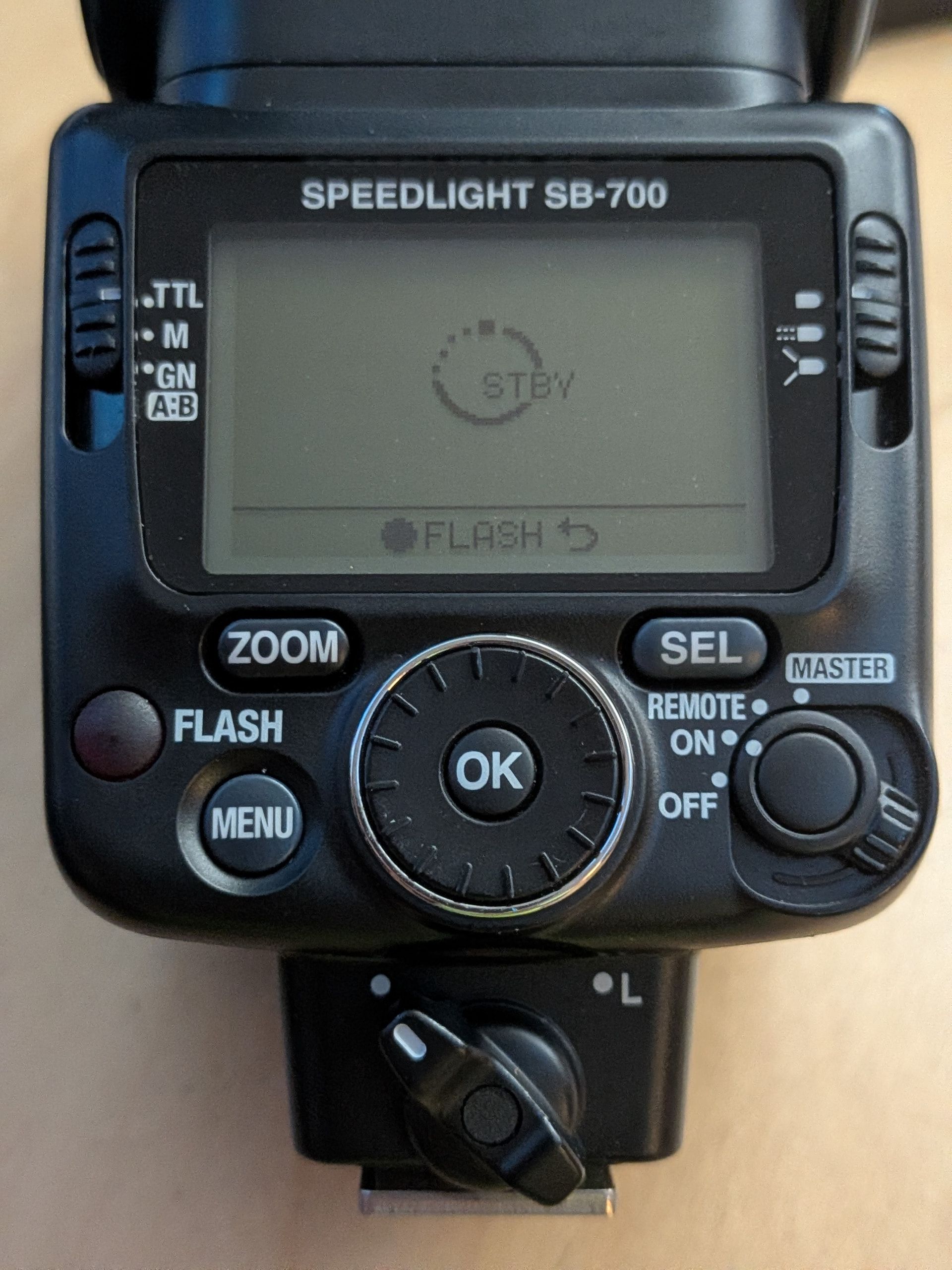
For bounce flash on the Nikon SB-700, use TTL mode and tilt/rotate the head to bounce light off a ceiling or wall.
Core settings (from the SB-700 manual)
-
Flash mode
Set the mode selector (left side) to TTL. This is the recommended mode for bounce flash. The unit will fire pre-flashes and the camera will adjust output automatically. -
Power / wireless switch
Set the switch on the right (labeled MASTER / REMOTE / ON / OFF) to ON for normal on-camera use. -
Flash head position
Hold the flash head tilting/rotating lock-release button and tilt or swivel the head:- Tilts up to 90° (and down 7°)
- Rotates 180° left or right
- Stops at click positions
Best results: Tilt the head up to bounce off a white ceiling. For vertical (portrait) orientation, also rotate the head. Softest light comes from bouncing off a surface behind the camera rather than in front. Keep the reflecting surface roughly 1–2 m (3–6.5 ft) away. Use white or highly reflective surfaces only—colored surfaces will tint the light. Make sure no light hits the subject directly.
-
Aperture / exposure
Bounce loses light compared with direct flash, so open the aperture 2–3 stops wider (smaller f-number) than you would for direct flash. Adjust based on results.Note: When the head is tilted/rotated away from the front, the LCD no longer shows the effective distance range. Check the range with the head facing forward first, set the aperture on the camera, then tilt the head.
Extra tips
- Catchlights (portraits): Tilt the head to 90° and pull out the built-in bounce card (pull the wide panel out with it, then slide the wide panel back in while holding the card out). This adds a small direct reflection in the eyes.
- Even softer light: Attach the included Nikon Diffusion Dome.
- Illumination pattern: Standard is fine; Center-weighted or Even can also work depending on the look you want.
- Camera settings: Any exposure mode works with TTL. Higher ISO (e.g., 400–800) helps with high ceilings or larger rooms. Keep shutter speed at or below the camera’s flash sync speed (or use Auto FP high-speed sync if available and needed).
- Zoom: The head zooms automatically with the lens focal length (or you can set it manually with the ZOOM button).
Your photo shows the unit in standby (STBY) with the flash-ready indicator, and the mode selector appears to be near TTL—good starting point. Mount it on the hot shoe, tilt the head, and shoot a test frame. Adjust aperture, ISO, or head angle as needed based on the results.
For direct (front-facing) flash with the diffuser deployed on the SB-700, use TTL mode with the head pointed straight at the subject.
The SB-700 has two common “diffuser” options:
1. Built-in wide panel (most likely what you mean by “diffuser lens deployed”)
This is the pull-out plastic panel that slides over the flash head.
Settings and steps:
- Mode selector (left side): TTL
- Power/wireless switch (right side): ON
- Flash head: Pointed straight forward (0° tilt)
- Deploy the panel: Carefully pull the built-in wide panel all the way out and position it over the flash head. Slide the bounce card back inside the head.
What it does:
- Diffuses the light, softens shadows, and helps prevent overexposure (especially useful at closer distances).
- Automatically sets the zoom head to a wide position (typically 12/14/17 mm equivalent on FX, or 8/10/11 mm on DX, depending on the illumination pattern).
- Good for wide-angle lenses or when you want slightly softer on-camera light without bouncing.
For close-ups (subjects closer than about 2 m / 6.5 ft), the manual also recommends tilting the head down slightly while using the wide panel so the lower part of the subject is properly lit.
2. Nikon Diffusion Dome (SW-14H – the included plastic dome)
- Attach it over the flash head with the Nikon logo facing up.
- Keep the head pointed forward for direct use.
- Mode: still TTL, power ON.
- It produces more diffusion and light loss than the wide panel alone. Zoom also goes wide automatically when the dome is attached.
- It is mainly designed for bounce flash (where it creates very soft light), but it can be used facing forward for softer direct light.
General notes for either diffuser
- TTL is the simplest and recommended mode — the camera handles exposure automatically.
- Because diffusion reduces light output, you may need a wider aperture or higher ISO than bare direct flash, but TTL adjusts for this. Check the effective distance range on the LCD (it displays when the head is facing forward).
- Illumination pattern (Standard / Center-weighted / Even) still applies and can be changed if desired.
- Confirm the flash-ready indicator is on before shooting.
Your unit is already showing the flash-ready / STBY state in the photo, so once you set the head forward, deploy the panel (or attach the dome), and switch to TTL, you’re ready for direct diffused shots. Test a frame and adjust aperture/ISO if needed.